Transformation Configuration
The transformation configuration page can help apply changes to your parsed raw data ingested in the system, from this page you will be able to:
- Trigger Datasource Flows for your ingested or existing data
- Create Channels for your Datasource
- Create Tags on your Datasource
- Create properties on the triggered flows
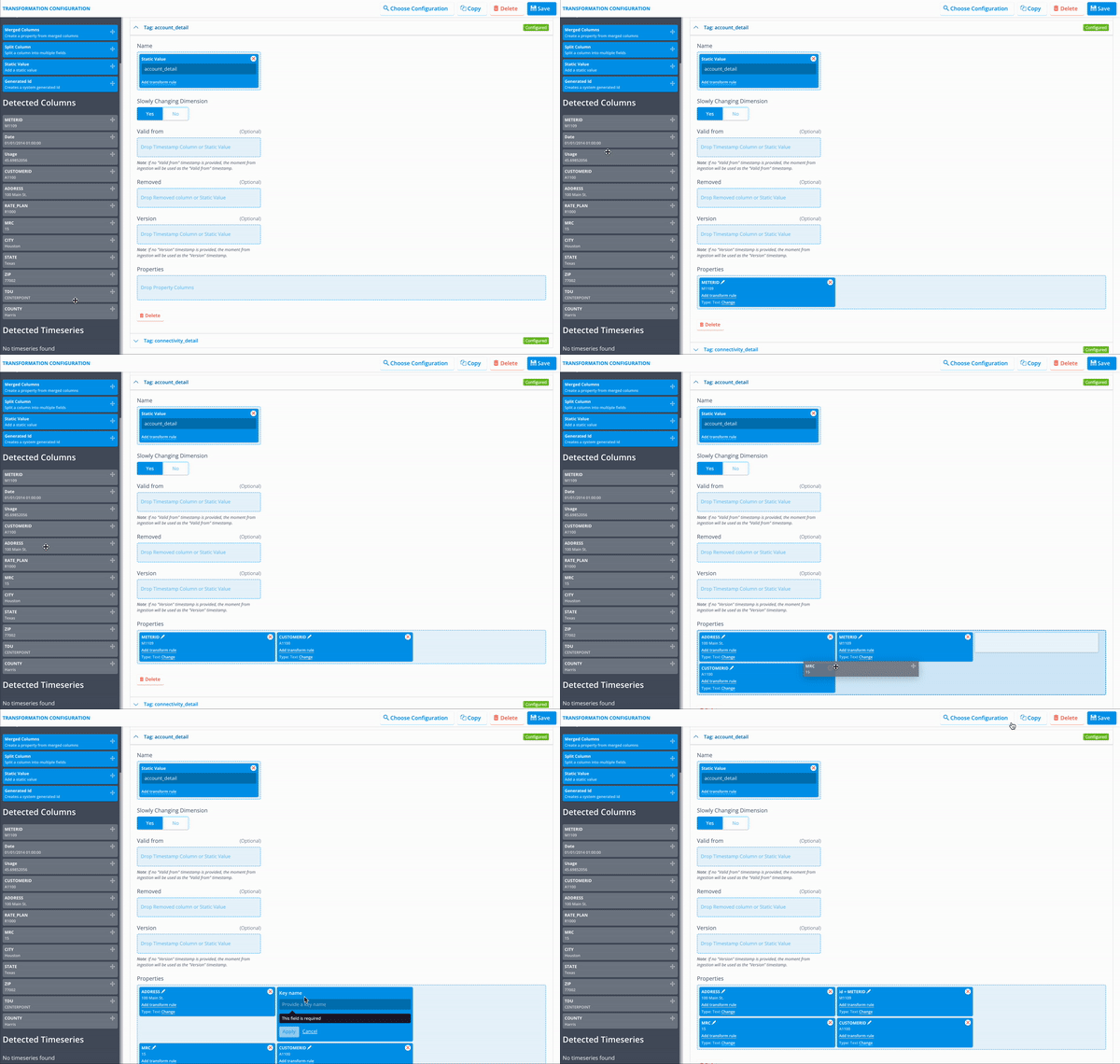
The main interaction method with this view is the drag'n'drop feature from the columns detected from your parsed data files, plus applying any transformation by attaching a transform rule.
Can't see the rule you're looking for?
Transformation Configuration makes rules of type Transform available to the user for selection, make sure you have created your rule with the right type
We'll discuss each of these features below.
Datasource
From this section, you're able to create your datasource and its relevant details. Note that when applying this transformation to the datasource multiple times, it'll override your values such as properties or timezone.
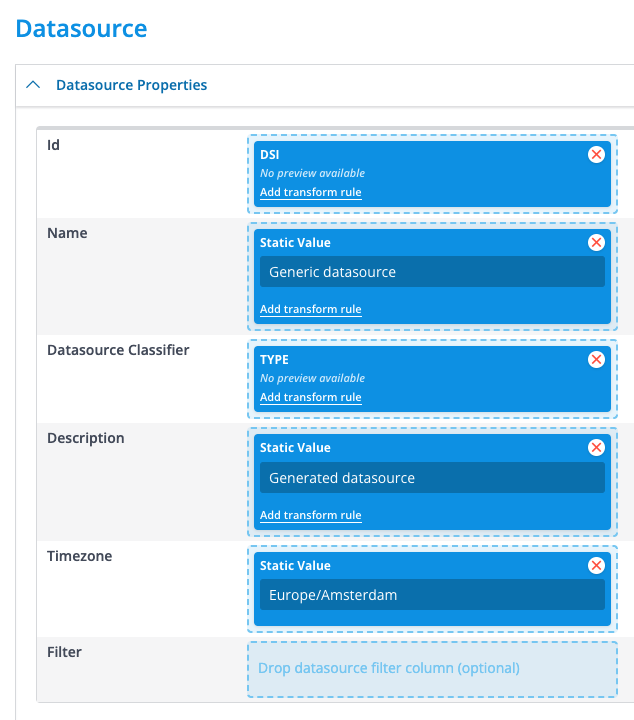
[Note: Adding a filter value will create a Virtual Datasource and not a physical one. The main goal of Virtual Datasources is to aggregate a collection of datasources based on the provided filter]
Datasource Flows
Configured Datasource Flows can be started by simply adding them from the selection modal. Only a single datasource flow can be executed upon the ingestion of a singular file. This flow is commonly referred to as an “ingestion flow” or “datasource ingestion flow”.
Tags
Here, tags can be created from the ingested file. The name of a tag can be set either statically or dynamically with a field. Unlike with channels, setting a tag name dynamically is very uncommon but can be useful if the file itself makes sure that tag names are consistent or the name of the tag varies slightly depending on the incoming file, and thus a transform rule would use that field to determine the name to use.
Tags are simple key-value tables that also have a name (the tag name). They are useful for storing metadata about the specific datasource that cannot be stored as timeseries data, like location or hardware details; or data like contract information. Tags can be created in two different flavors: Static and SCD. Static tags have a single version that is always valid and active. They are most commonly used for storing metadata that does not change, like the hardware details of a specific meter (serial number; manufacturer; etc.) or the location where this meter is installed. An example is shown below.
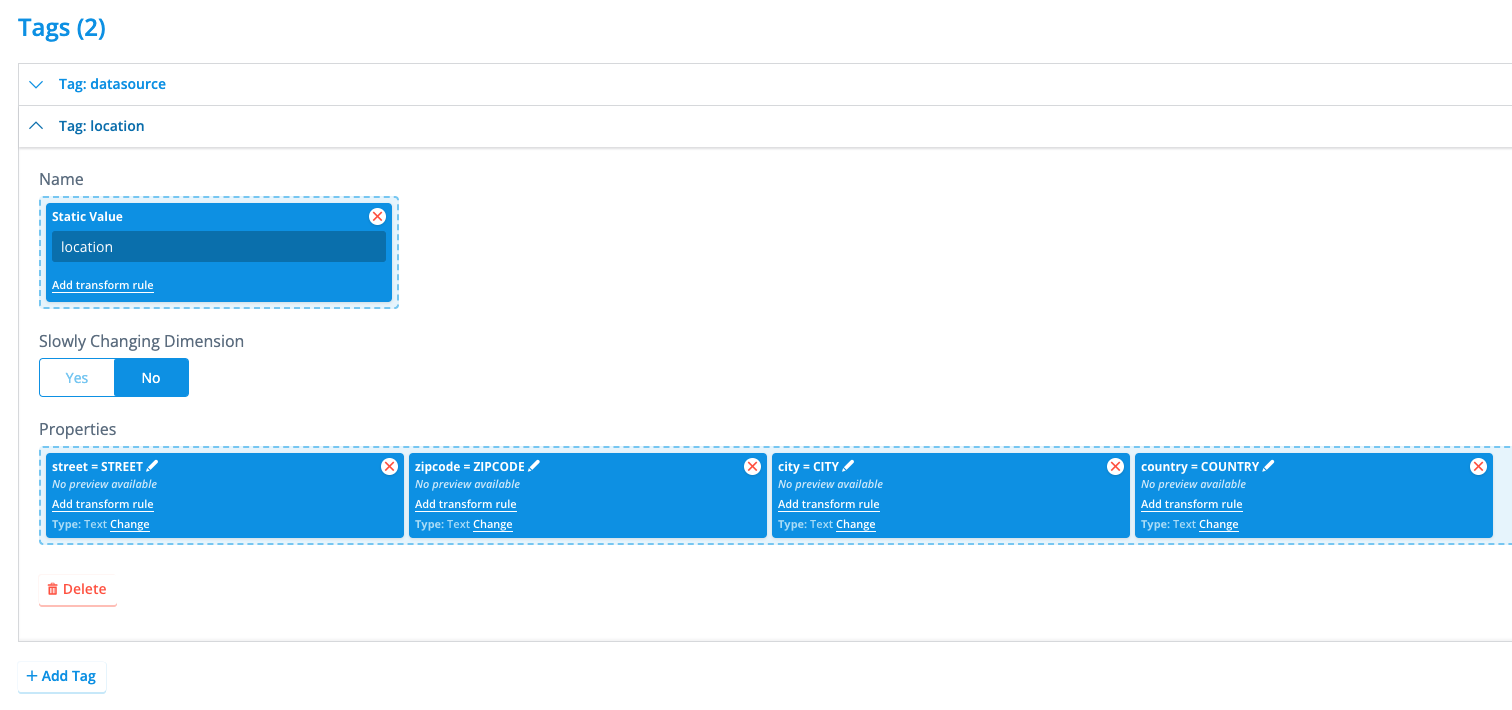
Here, we specified a tag named location which contains four different properties of the type text and each describes a portion of the location of the meter this datasource is associated with. This tag is not set to have Slowly Changing Dimensions, and therefore will only have one single version in the platform.
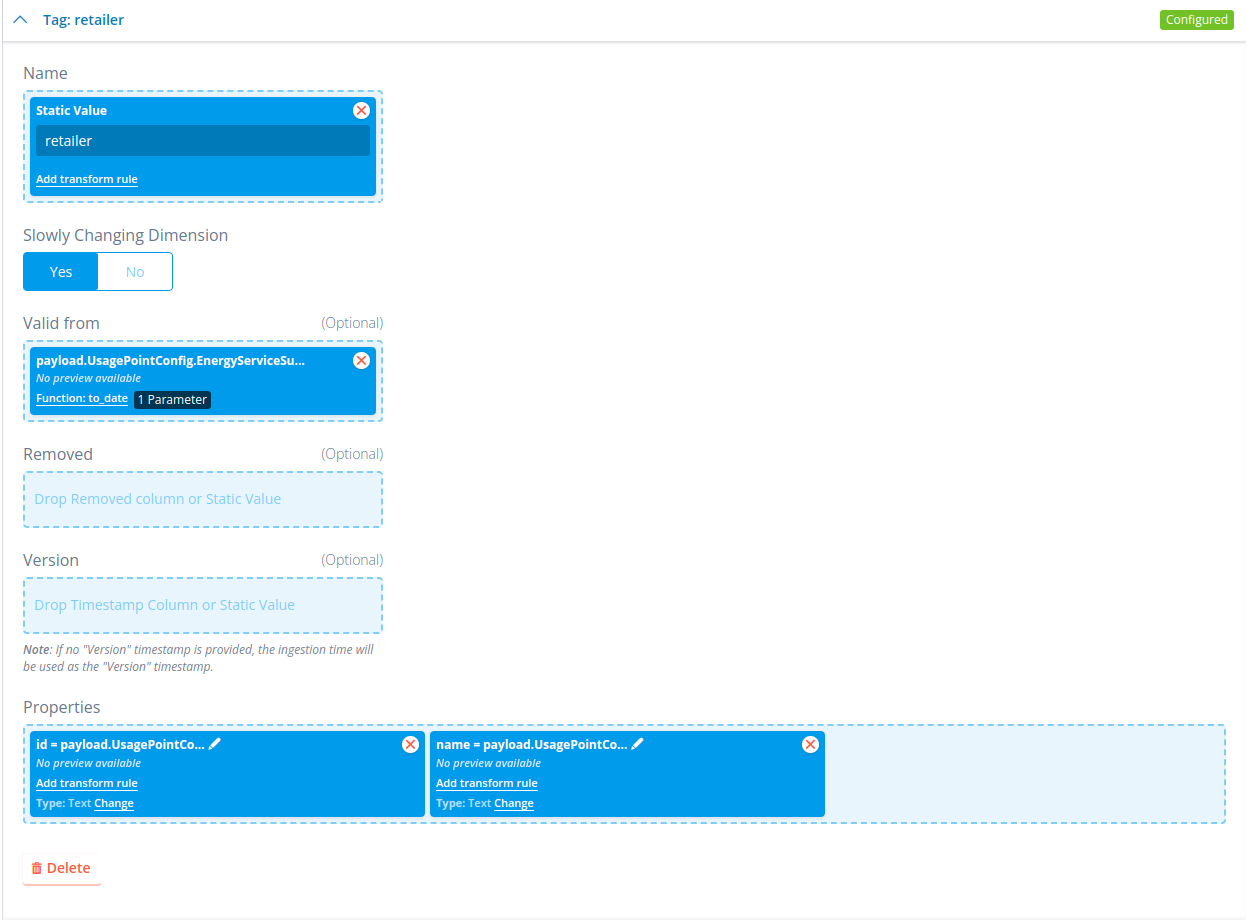
You can also create a tag with slowly changing dimensions set to Yes. This will give you a few extra options where you can state what the version and valid_from is of the tag it creates, which default to the time of ingestion if not filled. This will create a tag timeline on the datasource once multiple versions of the tag have been ingested. This looks like this:
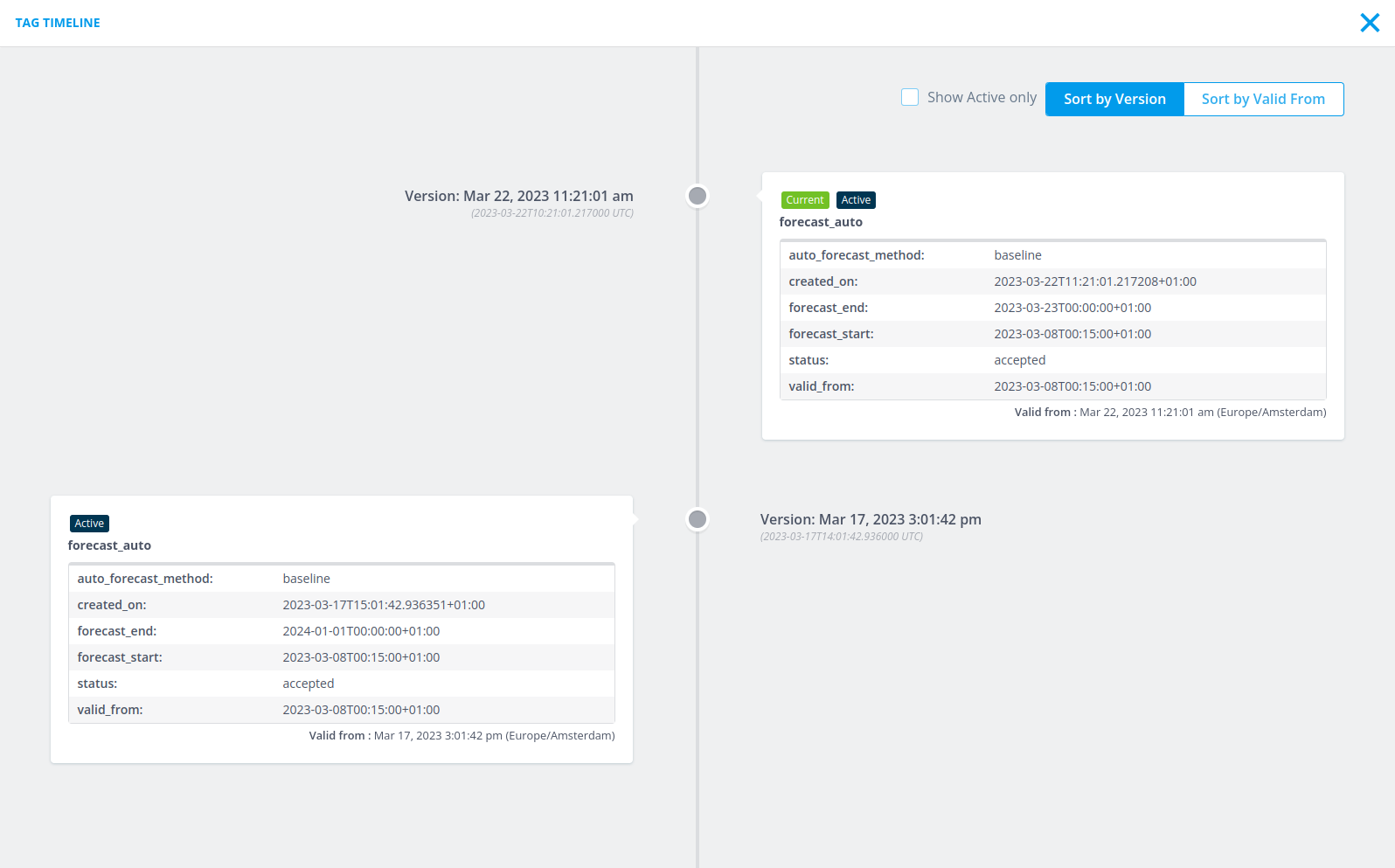
Here, we can see a tag that has two different versions, each with a different valid from as well. The way the tag timeline works is that a tag is active (and thus has an effect) if it has a valid_from that is earlier than all tags that have a version that is earlier. This tag will be active until it reaches a tag that has a valid_from and a version that are both more recent than this tag. This can be seen for example in the screenshot above. The first tag is active from 2023-03-17T15:01:42+01:00 (valid_from of that tag) until 2023-03-22T11:21:01+01:00 (valid_from of the second tag). A tag becomes completely inactive (has no effect) if there exists a tag with a newer version and a valid_from that is equal to or earlier than this tag. So, for example, if you were to add a new tag to the timeline shown above with a version of 2023-03-20T00:00:00+01:00 (later than the version of the first tag) and a valid_from of 2023-03-15T00:00:00+01:00 (earlier than the valid_from of the first tag), then the first tag would become completely inactive as there is no period in time where it was the latest version.
Channels
From this section, you're able to create channels for your datasources, it's good to think of these as labels that will be used to describe the nature of the timeseries you're writing to it. There are two different ways of specifying what channel the incoming data should be stored on: Static or Dynamic.
With static channel classifiers, you specify within the transformation configuration itself to which channel the timeseries data must be written. For example, something like this:
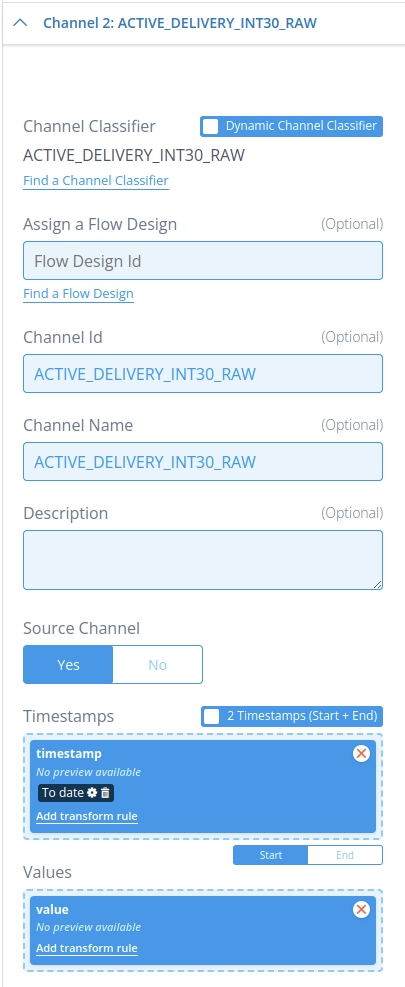
In this example, we configured the static channel classifier named ACTIVE_DELIVERY_INT30_RAW to take its timeseries values from the fields named timestamp and value for the timeseries timestamps and values, respectively. We have also stated that this incoming data is source data by setting Source Channel to Yes. This marks the ingested channel, in this example ACTIVE_DELIVERY_INT30_RAW, as a source channel, meaning that flows are not allowed to modify any of the timeseries data stored on this channel. Only ingestions can modify timeseries data on a source channel. Optionally, we could add the ID of a flow design under Assign a Flow Design: This will execute the flow associated with this ID as a channel flow, also commonly known as an “ingestion flow” or “channel ingestion flow”, providing the just ingested data to that flow to use. Keep in mind here that datasource flows cannot be provided here.
A more versatile manner of ingesting timeseries data is through the use of dynamic channel classifiers. Instead of specifying which channel classifier incoming data from a specific field in the file must be written to in the transformation configuration, the file itself specifies for each datapoint to which channel that datapoint must be written. In other words, the file has an additional field that specifies the channel classifier. An example can be seen below:
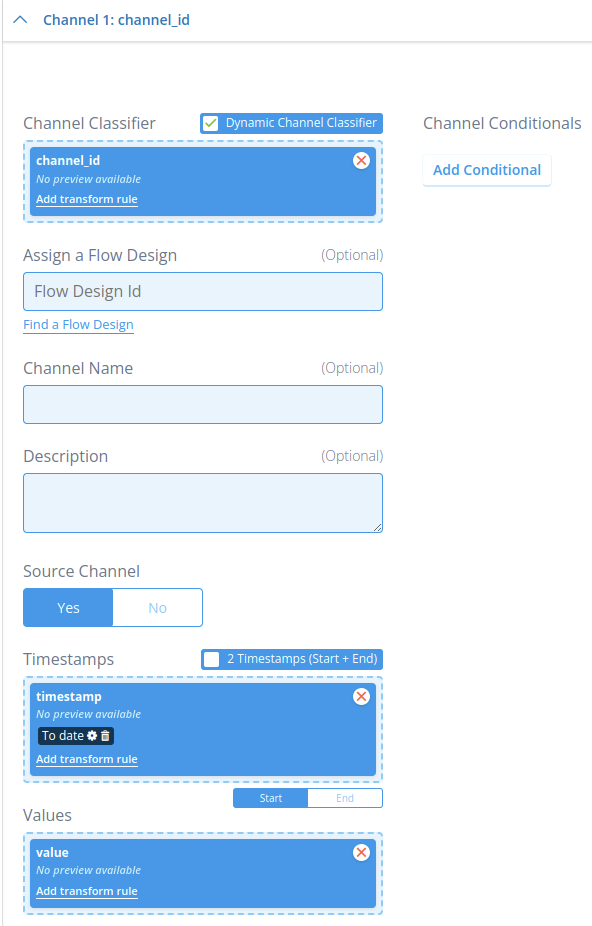
In this example, the field named channel_id specifies which channel classifier a corresponding datapoint made up by the values in timestamp and value must be written to. This can be the same channel classifier for all datapoints, or a different one for each. The advantage of this approach is that the contents of the file determines to which channel classifier timeseries data is written to, allowing for transformation configurations to be used for many different ingestions as long as they all follow the same formatting. For example, if a client always uses JSON files with the same formatting for meter data, then a single transformation configuration can handle all meter data ingestions, even if there are 40+ channels to be ingested. The disadvantage, however, is that you have to be extra careful with making sure that all required channel classifier configurations are present before ingestion, as the channel classifier can only be determined at the point of ingestion. This also means that the resource manager in the CLI cannot determine during a configuration transfer what the channel classifier dependencies are of a transformation configuration with dynamic channel classifiers (it will warn you about this though each time it encounters this situation).
While the Source Channel field works the exact same here as it does for static channel classifiers (whether to mark the ingested channel as a source channel), the Assign a Flow Design works a bit differently due to the addition of the Channel Conditionals tab. This tab, when opened, looks like the following:
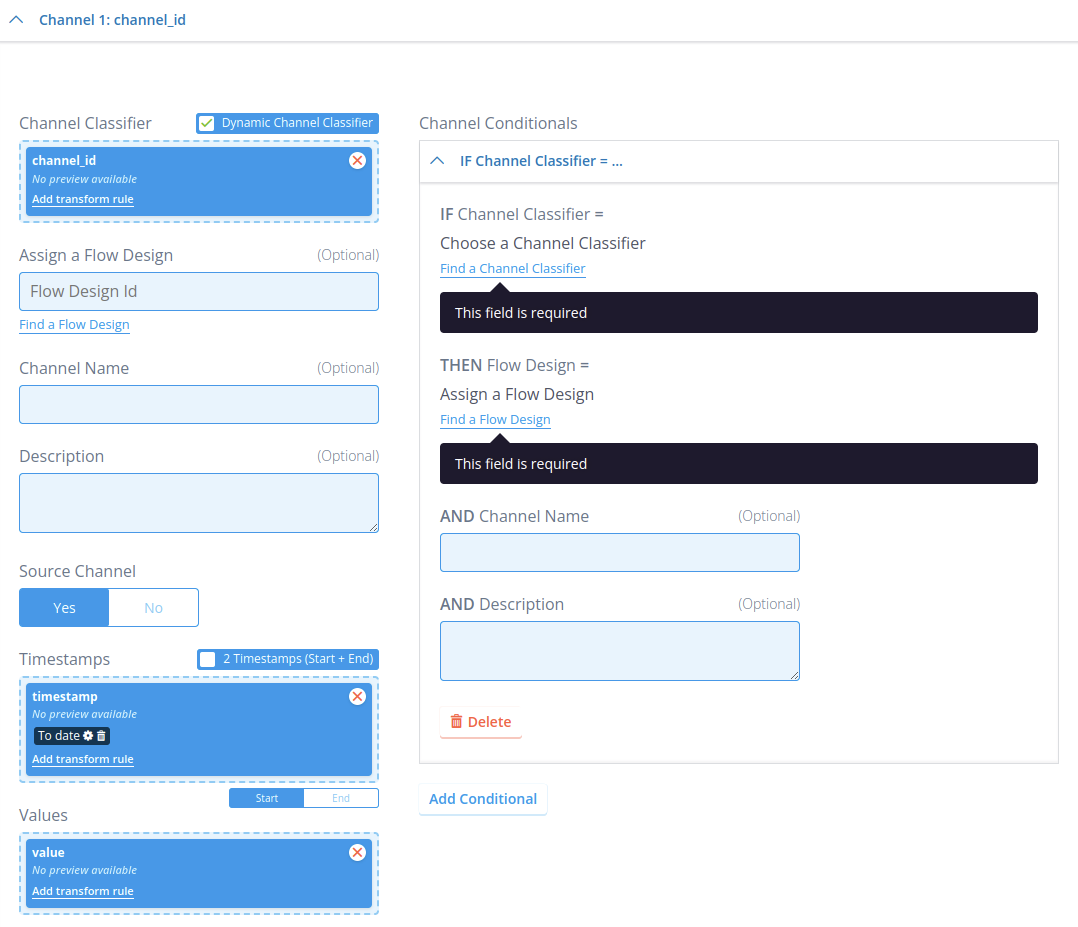
Because this one channel configuration in the transformation configuration can receive an undefined number of different channel classifiers, it would not be possible to assign a flow design to only specific channel classifiers. That is what the Channel Conditionals tab is for: Here, you can specify for each specific channel classifier that if they are ingested, then a specific flow design should be executed as a channel ingestion flow after ingestion for that channel is complete. This tab can take an unlimited number of entries if needed. Similarly to the static channel classifiers, all of these flows must be channel flows. If a channel classifier is ingested that does not have a matching entry in the Channel Conditionals tab, then ingestion will attempt to execute the flow design under Assign a Flow Design on that channel. So, instead of this flow design always being executed on each incoming channel that matches this channel configuration (like it is for static channel classifiers), it is instead used as the default flow to execute if there is no specific one configured in the tab. And of course, if this flow ID is not defined, then there is no default flow and only the flow IDs in the tab are considered.
Flow Properties
This takes one or more key-value pairs that are passed to any flow (both channel and datasource) executed from this ingestion. These key-value pairs are then available inside the rules within the flow under self.flow_properties. This is useful when an ingestion flow needs metadata that arrived with the file but is not worth storing permanently (e.g. a batch identifier or processing flag).
For a full description of flow_properties — including all supported types, unsupported types, and how to pass custom data between rules and chained flows — see flow_properties usage.
Ingestion-specific behaviour
There are several important differences when flow properties are set through a transformation configuration compared to setting them directly in a rule:
- All values are strings by default. Because transformation configurations receive all fields as strings, the values within flow properties are also strings. If you need a non-string type (e.g. an integer or float), use a transform rule to convert the value before it reaches the flow.
- Single vs. multiple rows. If only a single row was ingested, the flow property value will be a string. If multiple rows were ingested, the value will be a list of strings.
- NULL / empty values are dropped. Anything interpreted as NULL is removed from flow properties. If index spacing matters and you need to keep empty values, use a transform rule to convert
Noneto a placeholder string, then convert it back in the rule that reads the value.
Limitations
Only basic, JSON-serialisable types are supported in flow_properties. Storing complex Python objects (such as pd.DataFrame, pd.Timestamp, or custom class instances) is not supported — these cannot be parsed by non-Python backend services and will cause serialization errors, especially when flows are chained. Serialize any such objects to a plain dict, list, or string before storing them in flow properties.
Transform rules
Transform rules are a special type of rule whose purpose is to transform and prepare a field to be processed by the Energyworx platform. One of the most common use cases beside the previous one mentioned is to convert timestamp with local timezone to UTC.
For more details on how to write transform rules you can follow Transform Rule Implementation.
Convert timestamp fields
As transformation configurations always receive all data fields as string, it is necessary to use a transform rule on every field that is a timestamp that converts that field to a datetime.datetime.timestamp. So, for example, the timestamp field for channels needs to be converted, and so do the version and valid_from fields for SCD tags.